Extract the Spanish audio, transcribe it with timecodes, translate the transcript into English, save it as an SRT or VTT file, then upload it as a subtitle track — or replace the audio with an English dub.
What "translating a Spanish video" actually means: subtitles, captions or a dubbed English track
Three very different deliverables hide behind the same request. Someone who asks you to "translate this Spanish video to English" may want a timed subtitle file, a burned-in caption layer, or an English voice replacing the original audio. Decide which one you owe before you touch the timeline, because the transcript work and the budget diverge immediately.
| Deliverable | What the viewer gets | Best for |
|---|---|---|
| Subtitle file (.srt, .vtt, .sbv) | Original Spanish audio, English text on screen, toggleable | YouTube, Vimeo, LinkedIn, course platforms |
| Burned-in (open) captions | English text baked into the picture, always visible | Instagram, TikTok, silent autoplay feeds |
| Closed captions for accessibility | English text plus speaker IDs and non-speech sounds | Compliance, deaf and hard-of-hearing viewers |
| English dub | New English voice track over the original picture | Training videos, kids’ content, long documentaries |
Subtitles and captions are not synonyms. A subtitle assumes the viewer can hear but not understand the language; a caption assumes the viewer may not hear at all, so it marks who is speaking and what the door slam was.
Dubs cost more and take longer, but they survive small phone screens and distracted viewers. Subtitles keep the original performance, which matters a lot for interviews, stand-up and anything where the speaker’s tone carries the meaning.
Step 1 — Pull a clean Spanish transcript with timecodes from the video
Rough planning estimate (ours, not a sourced figure): 15–45 minutes for a 10-minute video. You need: the source file, an audio extractor such as ffmpeg, and a speech-to-text tool.
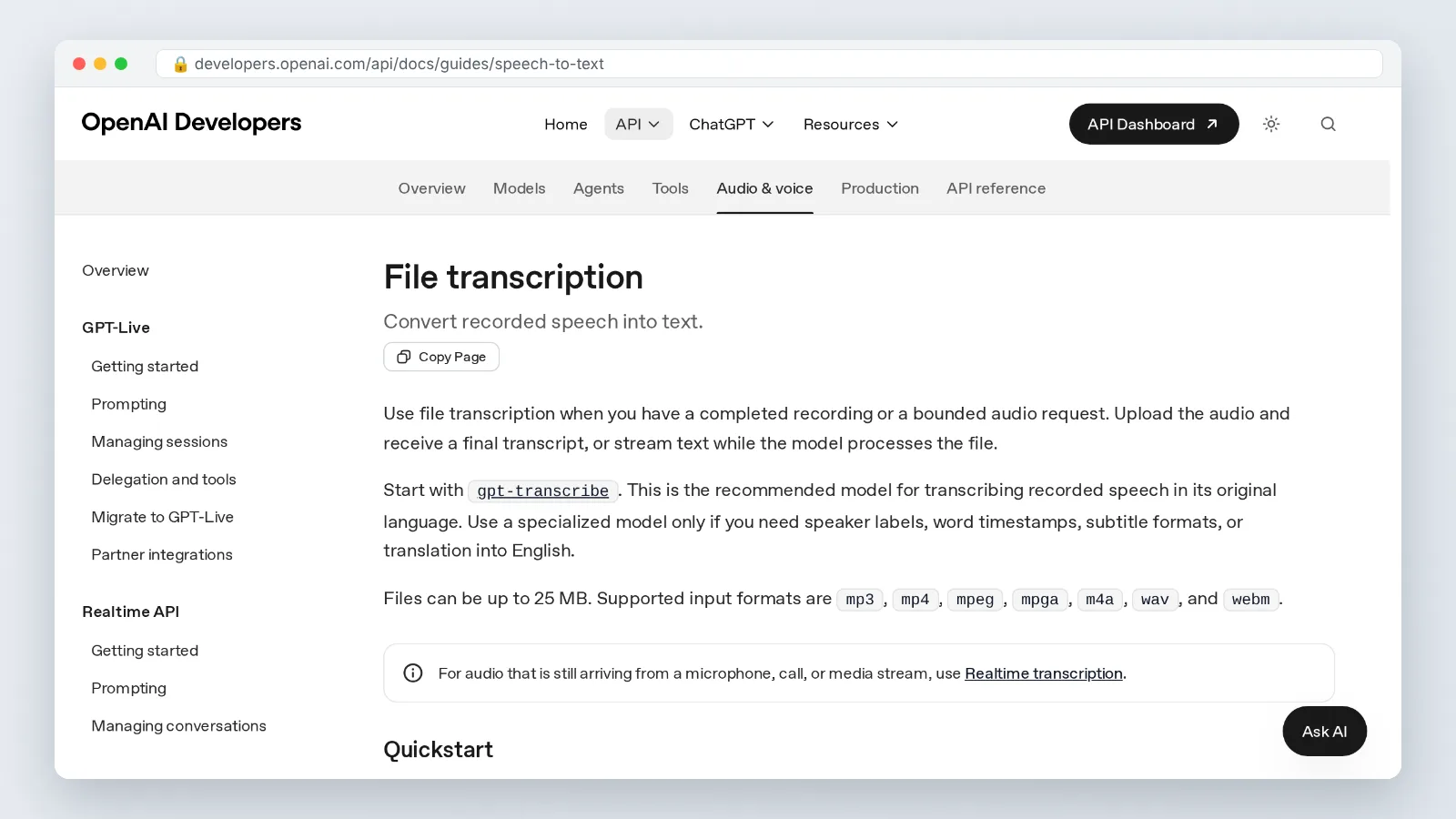
Start by separating the audio. OpenAI’s speech-to-text guide states that its file transcription endpoint caps uploads at 25 MB and accepts mp3, mp4, mpeg, mpga, m4a, wav and webm, so a 40-minute Spanish interview recorded in 4K has to be stripped down to audio or compressed before it will go through. As editorial practice, we export a mono 16 kHz MP3, which usually solves it without hurting recognition — that is our working habit, not an OpenAI specification.
Long videos need a different pipeline. Microsoft Learn documents the same 25 MB ceiling for the Azure OpenAI transcription model and points users to Azure Speech batch transcription for files up to 1 GB, which is the practical route for a two-hour conference recording in Spanish. Note that batch transcription is a separate Azure Speech service with its own pricing, not a drop-in swap for the 25 MB endpoint.
Set the transcription language to Spanish explicitly. Auto-detect gets confused by code-switching, and a Mexican speaker dropping English product names mid-sentence can flip the whole segment to the wrong model.
Then read the raw transcript against the audio before you translate a word. YouTube’s own help pages warn that automatic captions can misrepresent what was said because of mispronunciations, accents, dialects or background noise, and tell creators to review and edit them — a warning worth taking seriously with Caribbean Spanish, rural Andean speakers or anyone talking over a market crowd.
Fix proper nouns, numbers and currency first. Those are the errors that make an English viewer stop trusting the subtitles.
Step 2 — Translate the Spanish transcript into natural English
Rough planning estimate (ours, not a sourced figure): about an hour per 10 minutes of dialogue if you are revising machine output. You need: the corrected Spanish transcript and a glossary of names and recurring terms.
Translate the transcript as text, not as subtitles. Working in a document lets you see the paragraph around each line, which is how you catch that *ya* means "already" in one sentence and "enough" in the next.
There is a shortcut worth knowing. OpenAI’s speech-to-text guide notes that its audio translation endpoint can only output English, which makes it a one-step Spanish-audio-to-English-text route — and useless if you ever need French or Japanese from the same source.
Spanish-specific traps to resolve before you format anything:
- Usted vs tú — English has no grammatical equivalent, so carry the formality through word choice and contractions instead.
- Diminutives — *ahorita* is not "right now" everywhere; in Mexico it can mean "in a while."
- Regional slang — *chamba*, *guagua*, *pana*, *vale* all shift meaning by country; check where the speaker is from.
- Filler words — *o sea*, *este*, *pues* usually get cut in subtitles, kept in dubs if the performance needs them.
- Idioms — translate the intent, not the image. *Me cayó el veinte* is "it clicked," not a falling coin.
Spanish sentences often run longer than their English equivalents, but English subtitles still swell when you translate literally. Cut hedges, greetings and repeated names at this stage so you are not fighting character limits later.
Keep a running glossary. If the speaker calls their program *el taller* throughout, it must be "the workshop" in every single cue.
Step 3 — Build and format the English subtitle file (SRT, VTT or SBV)
Time: 30–60 minutes per 10 minutes of video. You need: a subtitle editor (Subtitle Edit, Aegisub, or your NLE’s caption panel) and the translated text.
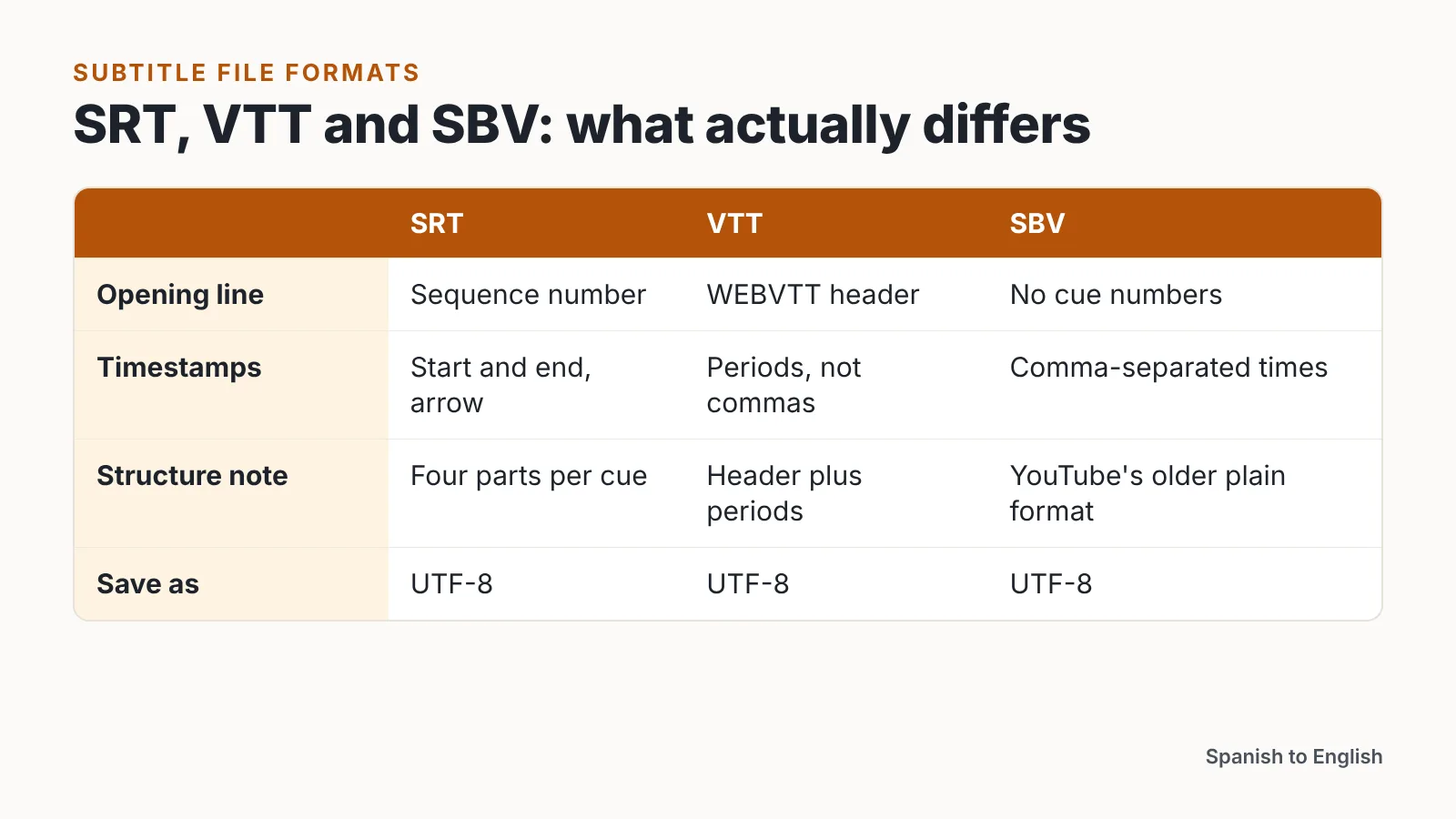
An SRT cue has four parts: a sequence number, a timecode line with start and end times separated by an arrow, one or two lines of text, and a blank line. VTT uses a WEBVTT header and periods instead of commas in the timestamps. SBV is YouTube’s older plain format with comma-separated times and no cue numbers.
Line length is where translated Spanish gets you. Netflix’s Castilian and Latin American Spanish timed text style guide limits subtitles to 42 characters per line. That is a Spanish-language specification, not an English one, and we use it here purely as a cross-language benchmark when your English rendering runs longer than the Spanish original it replaces.
Reading speed is the second constraint. Netflix’s subtitle template guide caps reading speed at 17 characters per second for adult programs, which is the standard to aim for when you condense translated dialogue rather than letting cues stack up.
Practical formatting rules that keep cues readable — editorial practice from our own workflow, not platform or Netflix requirements:
- Two lines maximum per cue, with the top line shorter than the bottom when possible.
- Break lines at grammatical joints — after a clause, never between an article and its noun.
- Hold each cue on screen long enough to read twice at a glance; we treat anything under one second as too fast for more than a single word.
- Snap cue ends to shot changes so text does not bleed across a cut.
- Save as UTF-8 so accented vowels and ñ survive.
Step 4 — Add an English voice track if you need dubbing instead of subtitles
Time: a few minutes per minute of video with AI dubbing; a half-day or more with a human voice actor. You need: the approved English script, a clean music-and-effects track if you have one, and a voice.
Dubbing replaces the audience’s effort with your budget. Price it per minute before you commit: ElevenLabs lists AI dubbing through its API at $0.33 per minute for automatic dubbing with a watermark and $0.50 per minute without the watermark or in Dubbing Studio, according to its API pricing page.
One platform option for teams that also need an on-screen presenter is DeepBrain AI’s AI Studios, a cloud platform for AI avatar videos, text-to-video content and video translations. AI Studios offers text-to-speech voiceovers in 150+ languages and accents on paid plans and 30+ languages on the Free plan, more than 1,000 AI voices, and voice cloning from a short recording.
The limitation is volume. AI Studios’ Personal plan includes 120 minutes of AI dubbing per month, the Team plan includes 240 minutes of AI dubbing per month, and once those minutes run out additional dubbing is deducted from generative credits — so a back catalog of hour-long Spanish webinars will burn through an allowance fast. A scripted corporate video with a hired English voice actor and a real mix engineer still wins on emotional range.
Match pacing to picture, not to the page. English lines that run long force the voice to rush, and a rushed dub reads as cheap even when the translation is accurate.
Step 5 — Burn in, upload and test the English version on your platform
Time: 20–40 minutes including a full playback check. You need: the finished subtitle file or dub mix, and a test account on the destination platform.
Upload the sidecar file rather than burning text into the picture whenever the platform supports it. YouTube Help states that it accepts .srt files but only in basic form — no styling markup is read, and the file must be saved as plain UTF-8, which matters because Spanish accents and ñ break in other encodings.
Name the track correctly. Set the language to English and, if the platform allows it, label it as a translation rather than a caption for the deaf and hard of hearing, since those are different accessibility signals.
For social platforms that autoplay muted, burn the captions in. Keep them inside the safe area so the platform’s own UI does not cover the bottom line on a phone.
Play the whole thing back on a phone before you call it done. Desktop previews hide the two failures that matter most: text too small to read and cues that drift out of sync after a mid-video edit.
Check the dub against the original picture at full length too. A dropped frame in a 45-minute file will push the English voice off the speaker’s mouth by the end.
Pre-publish quality checklist for English subtitles and dubs
Run this before anything goes live. Each item catches a failure that viewers notice immediately.
- [ ] Spanish transcript reviewed by ear against the audio, not trusted as generated.
- [ ] Every proper noun, place, number and currency verified.
- [ ] Glossary terms translated consistently across all cues.
- [ ] No cue exceeds two lines on screen.
- [ ] Reading speed checked against the 17 characters per second ceiling Netflix sets for adult English subtitle templates.
- [ ] Line lengths kept near the 42-character-per-line limit in Netflix’s Spanish timed text style guide, used as a cross-language benchmark.
- [ ] File saved as UTF-8; accented characters and ñ render correctly after upload.
- [ ] Cue timings snapped to shot changes; no text crossing a cut.
- [ ] Speaker IDs and non-speech sounds included if the deliverable is closed captions.
- [ ] Dub audio level matched to the original mix; no clipping on loud lines.
- [ ] Lip-sync drift checked at the start, middle and end of the file.
- [ ] Final playback on a phone, muted and unmuted.
- [ ] Language and track label set correctly on the platform.
Keep the corrected Spanish transcript and the English translation as separate files. When a client asks for a Portuguese version next quarter, you start from clean text instead of re-transcribing the video.
Common mistakes when translating Spanish video to English (and how to fix them)
The most expensive mistake is translating straight from auto-generated captions without listening to the audio. A mis-heard *no* becomes a *yo*, the sentence flips meaning, and nobody catches it until a viewer comments — which is exactly why YouTube Help tells creators to review and edit automatic captions, since mispronunciations, accents, dialects and background noise can make them misrepresent what was said. Fix: always do one pass with headphones against the Spanish waveform before translation begins.
Second mistake: translating word for word and letting cues balloon. The English runs past the line limit, the subtitle editor splits it into a third line, and the viewer stops watching the picture. Fix: condense at the transcript stage, not at the formatting stage.
Third: ignoring who is speaking. Spanish conversation overlaps more than scripted English, and two people talking at once needs hyphens and speaker markers, not one merged cue.
Fourth: wrong file encoding. A subtitle saved as ANSI turns *año* into mojibake on upload, and the fix is a one-click re-save as UTF-8.
Fifth: dubbing something that should have been subtitled. Interviews, testimonials and comedy lose their credibility when the original voice disappears — keep the Spanish audio and give the viewer English text instead.
Frequently asked questions
Can I translate a Spanish video to English in one step?
Yes, for English specifically. OpenAI’s speech-to-text guide notes that its audio translation endpoint can only output English, so Spanish audio goes straight to English text in a single call — but you still need to time, format and proofread the result before it becomes a usable subtitle file.
What file size limits apply when transcribing a Spanish video?
OpenAI’s speech-to-text guide caps file uploads to its transcription endpoint at 25 MB across mp3, mp4, mpeg, mpga, m4a, wav and webm. Microsoft Learn documents the same 25 MB ceiling for the Azure OpenAI transcription model and points to Azure Speech batch transcription for files up to 1 GB — a separate service with its own pricing, not a drop-in swap for the 25 MB endpoint.
How long should each English subtitle stay on screen?
Long enough to read comfortably at the reading speed Netflix sets for English subtitle templates, which its guide caps at 17 characters per second for adult programs. Short single-word cues can be brief, but as an editorial rule of thumb we treat anything under one second as too quick for the viewer to register.
Should I use subtitles or an English dub for a Spanish video?
Subtitles when the original voice carries meaning — interviews, testimonials, comedy, anything where tone matters. Dubbing when viewers are watching hands-free or on small screens, such as training and children’s content. Dubbing also costs per minute: ElevenLabs lists $0.33 per minute with a watermark and $0.50 per minute without, according to its API pricing.
Why do my Spanish accents break after uploading subtitles?
Encoding. YouTube Help states that it accepts .srt files only in basic form, with no styling markup read and the file saved as plain UTF-8, which is exactly why á, é, í, ó, ú and ñ turn into garbled characters when a subtitle file is saved in another encoding.
Sources
- File transcription — OpenAI API docs (Speech to text guide)
- Transcription models from OpenAI — Microsoft Learn (Azure AI Speech)
- ElevenLabs API pricing
- Castilian & Latin American Spanish Timed Text Style Guide — Netflix Partner Help Center
- Timed Text Style Guide: Subtitle Templates — Netflix Partner Help Center
- Supported subtitle and closed caption files — YouTube Help
- Use automatic captioning — YouTube Help
AI tools helped write this guide. The Spanish to English Editorial Team published it after checking every figure against the sources linked above.